Watching a Pit Stop Without Losing the Race
Learn how to follow a racing pit stop through the timing screen, crew activity, traffic, and rival stops so you can see what changed on track.
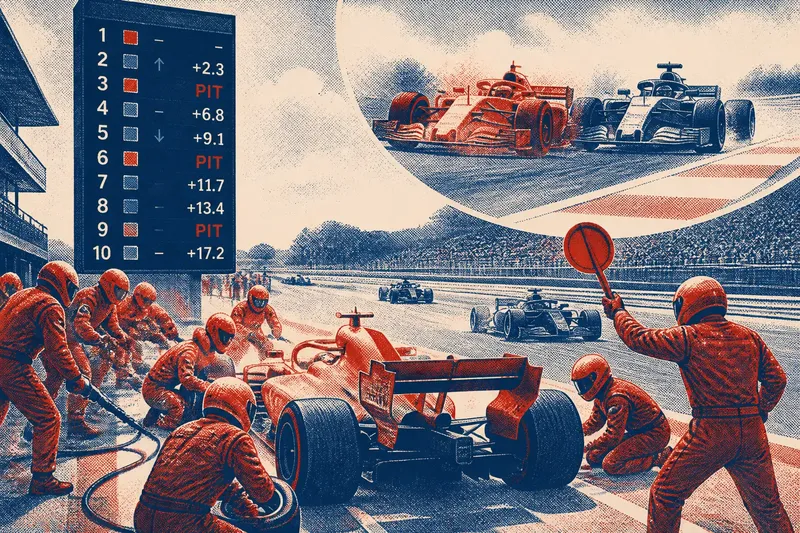
A racing pit stop can change a car’s place before it reaches the next corner. To follow the change, note the order before the stop, watch the car rejoin, and check what its nearest rivals do while it is in the lane.
The stopped car is only part of the story. A driver may enter ahead of a rival and emerge behind it because the rival stayed on track, traffic crowded the pit exit, or the cars stopped at different times. Keep the timing tower in view alongside the pit lane.
Track the order
Before a car pits, note its position and the nearest competitor. A timing tower can show whether that rival has already stopped or is still circulating. If the display includes gaps, use them to judge how close the cars are before the sequence begins.
Cars in the same part of the order may be on different tire strategies and therefore face different stop schedules. One snapshot cannot show the settled result while one car has stopped and another has not.
Say you are following a car just ahead of a rival. The first car pits, and the rival moves ahead on the timing tower while staying on track. Later, the rival stops and the first car returns to the lead. The temporary change was part of the pit sequence, not necessarily a lasting loss of position.
Read the crew’s rhythm
A pit crew divides the work among assigned roles, so several actions happen at once. You do not need to identify every tool or movement. Notice whether the car reaches its mark, whether the crew works in a coordinated pattern, and whether the driver leaves cleanly.
Camera angles can hide parts of the crew’s work. A close shot may emphasize one action, while a wider view shows how the team coordinates around the car. Follow the overall rhythm rather than trying to name every movement.
A delay may not be clear from the live image. The car could be waiting for another vehicle in the lane, or the crew may need extra time. Check the timing display and look for a replay before assigning a cause.
Follow the exit
The pit exit shows how the stop meets the race again. Compare the car’s position after it rejoins with the rivals that were nearby before it entered. A car may leave behind a competitor but still be on a different strategy, so keep checking the order as the race develops.
Traffic can shape the next part of the race. A car may rejoin among other cars rather than into clear space. Watch whether it can hold or improve its position once back on the circuit.
Also watch for a rival nearing pit entry as the first car exits. Their routes through the stop sequence overlap even if they are not side by side. The timing screen can help show whether the gap between them is growing or shrinking.
Check the evidence
- Observe the nearest rival before the stop. If that rival has already pitted, compare the cars’ positions and gaps; if not, keep following its stop before judging the order.
- Observe the car’s position after it exits. If it has lost a place, check whether the rival has completed its own stop; if not, treat the order as temporary and check again later.
- Observe whether the car rejoins in traffic. If nearby cars limit its progress, watch the next section of track; if it rejoins clear, follow whether it can maintain that space.
- Observe a delay in the lane or at the release. If the timing display also shows a position change, check a replay for context; if no cause is visible, leave the reason open rather than guessing.
- Observe the timing tower during a camera cut. If it shows a pit indicator or a changed position, use that to locate the car; if it does not, wait for the next update or replay.
- Observe the crew from a wide camera angle. If the car leaves cleanly, return your attention to the track order; if it waits, check whether another vehicle or a visible crew action explains the delay.
How does pit strategy change the order?
Why do cars pit at different times?
Teams may choose different timing to manage tires, respond to rivals, or avoid traffic. A car that stops earlier may find clear track, while a car that stays out can temporarily hold a higher position.
What is an undercut?
An undercut is an attempt to gain time by pitting before a nearby rival and using fresh tires sooner. Its effect depends on the rival’s pace, traffic, and stop timing, so follow the sequence until both cars have stopped.
What is an overcut?
An overcut is an attempt to stay on track longer than a rival who has pitted, then gain an advantage before making the stop. The extra laps help only if the car maintains useful pace and avoids losing too much time in traffic.
When has the order settled?
Compare the order after the nearby rivals have completed their stops. A lasting position change is easier to judge once the cars are back on comparable footing, rather than midway through the pit cycle.
Stay with the sequence
After the car rejoins, follow it for a few corners or until the next timing update. It may have entered traffic, found clear track, or returned to a direct fight with a rival. Those surroundings help explain what happens after the stop.
For a clear view of a racing pit stop, keep a simple sequence in mind: establish the order, watch the crew’s rhythm, follow the exit, and check the rivals’ stops. The timing display then becomes a record of how the race order is changing, not just a list of places.
When another car pits, follow its nearest rival as well. That comparison can reveal whether the first stop changed a lasting position or only the order for a few laps.